


Self-service Kiosk Considerations for People with Disabilities
Right now, we have self-service kiosks deployed in a wide range of industries. Self-service kiosks are common in restaurants, banks, airports, colleges, retail outlets, hospitals etc. And the kiosk machines are well-known for their convenience. People appreciate kiosk machines for their ease of use and convenience. But, what if someone with a disability can’t appreciate this “convenience”? Here lies the issue of self-service kiosk accessibility. A person with a disability has the right to access the information and services just like any other individual without a disability. At Panashi, we understand the importance of accessibility in self-service kiosks. We have several suggestions too, to implement the most-needed disability inclusion. Read on to learn more.
How to be inclusive of people with disabilities? (social inclusion)
Let’s go through some data pertaining to disability. According to the latest statistics published by the World Health Organization (WHO), around 1.3 billion people in the world experience some sort of disability. This means that around 16% of the total world population have substantial disability. Out of 100 people in the world, 16 individuals experience disability in some way or the other. According to the United Nations study, out of 1.4 billion of the total population in Africa, more than 80 million people in Africa experience disability of varying types. Disability prevalence rate in the MENA region is calculated to be around 2.16% based on the data published by Statista in 2017. The lowest disability prevalence rate is in Qatar – 0.19% and the highest in Morocco – 5.07%.
Inclusive environments should be the norm in civilized societies, whether in the workplace, public places, commercial centers, or at home. Everyone needs to be heard, visible, and not left behind. Certain useful and noteworthy practices to build and promote an inclusive society are listed below.
- Consider people with disability as your targeted customers
People with disability have their dreams and career-goals, they have the potential to work for whatever they feel like and pursue tasks just like any able-bodied individual. So, why exclude them? Put people with disabilities in your market research and come up with impactful marketing campaigns that focus on Disability Inclusion.
- Start from schools and colleges
Make children and youngsters aware of the differences. If necessary, introduce Disability and inclusion-related studies, classes or workshops at schools and colleges. Students co-existing in a learning environment, understanding the talents, tastes and differences of their peers would appreciate inclusion. Schools and colleges serve as great learning platforms to understand social inclusion.
- Provide sufficient employment opportunities
Disability of some form should not be perceived as a limitation or a future liability. If a disabled person shows the willingness to work and has acquired the necessary expertise or experience to take up a particular job, why not move forward with the application?
Create the most necessary awareness regarding Digital Inclusion in organizations to create an atmosphere of empathy and understanding. Employees should be able to understand the relevance of inclusion in organizations. Organizations can even implement Accessible technology to accommodate employees with disability.
What are Accessible self-service kiosks?
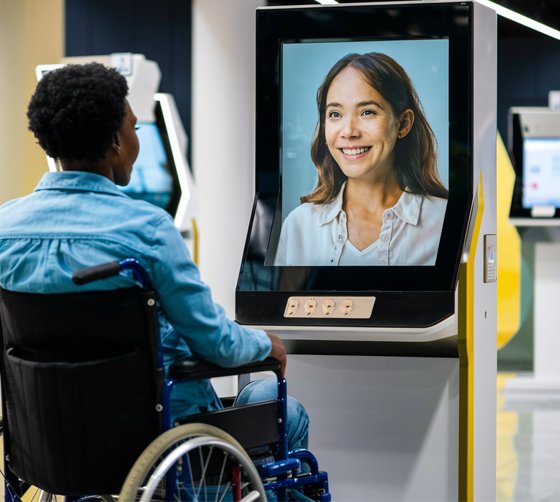
The accessibility of a product, equipment or service refers to how widely it can be used by its intended user base, including individuals with impairments. Understanding aspects related to accessibility, being conscious of the requirements of those with disabilities, and removing obstacles to improve user experience are all necessary to achieving accessibility.
A self-service kiosk should be designed to serve the needs of every individual and not restrict one’s use based on any disability. Accessible self-service kiosks consider these aspects and offer feasible solutions to address Accessibility. For this purpose, kiosk manufactures consider the scenarios like the kiosk settings, the intended user actions, the integration of both hardware and software components to improve accessibility etc.
Accessibility not only improves the overall user experience, it drives more visitors to the kiosk, and in the long run, improves the brand reputation too.
Self-service kiosk Accessibility - Challenges
Service providers may not have a clear-cut idea about what suits best for the disabled. A particular kiosk machine deployed with specific accessibility features may not cater to the needs of the entire disability community. Some of the common challenges involved in self-service kiosk accessibility are mentioned below.
- Most of the kiosk touchscreens have virtual keys and they do not offer any tactile support feature. This serves as a major impediment for customers with visual impairment.
- Customers with blindness may find it difficult to interact with the kiosk screen.
- Customers experiencing mobility impairment or having wheelchair assistance may have to deal with height and reach-related issues. The height of the kiosk screen and the angle at which it is set may limit access for wheelchair customers.
How to improve the Accessibility of self-service kiosks?
Based on the disability perspective, the service providers can consider three major customer scenarios, and they are listed below.
1. Visually impaired customers – A visually impaired person may be fully blind or experience limited vision. Service providers may integrate several components into the kiosk machine to support customers, and thereby improve their user experience. The input components should suit customers with vision problems.
- Service providers can include tactile keypads for the purpose of navigation. Using Assistive Technology like Screen magnification software and screen reading can help the visually impaired understand the instructions.
- The use of bigger key in keyboards or braille keyboards can help perform the input functions. Allot the required functionality to adjust the brightness of the screen, provide options to adjust the font size and contrast – all these accessibility features immensely help to cope up with visual impairment.
- Incorporating a speech-to-text and text-to-speech feature can be of assistance to the visually impaired.
- Provide an audio jack facility on the kiosk enclosure so that those in need can plug-in earphone and listen to the instructions.
- Provide color customization for kiosk screen. A color combination that suits a particular person with vision disability may not help another person.
2. Customers on wheelchair – When it comes to customers in wheelchairs, one of the prime considerations should be the convenience of accessing the kiosk. If the area is congested or there are physical obstacles on the path leading to the kiosk, it may not be accessible for a wheelchair user. In this scenario, physical aspects such as the height of the kiosk machine and screen, as well as reach aspects, need to be considered. The implementation of a wheelchair ramp can be of great help for customers with mobility issues.
In this regard, kiosk manufactures can adhere to the ADA compliance rules and guidelines. The civil rights statute known as the Americans with Disabilities Act of 1990, or ADA, forbids discrimination on the basis of disability. ADA Compliance clearly indicates the physical aspects pertaining to kiosk accessibility taking into consideration of the height and reach parameters. According to ADA regulations, the minimum and maximum height of the interactive touch points of the kiosk machine should be between 15 inches and 48 inches above the ground respectively. ADA also considers other accessibility aspects like mounting of the kiosk, minimum floor space requirement, regulations related to physical barriers around the kiosk etc.
3. Customers with hearing issues – Ensure the audio output is perfectly audible and provide the necessary volume controls to adjust the audio.
4. Feature a Help button – At certain occasions, disabled individuals might need external support to perform their desired action. Having a Help or Call button featured on the kiosk enclosure can deal with the same.
5. Gather feedback – It’s not that once you have incorporated all the necessary hardware and software integrations, it’s all set. Try to get the most important feedback from the users. Based on the user feedback, provide the necessary tweaks and adjustments to improve the overall kiosk experience.
Does the European Accessibility Act apply to self-service kiosks?
Yes, it does. The European Accessibility Act (EAA), Directive (EU) 2019/882, came into force on 28 June 2025. In simple words, it makes accessibility a legal requirement for self-service kiosks across the EU, including ATMs, payment terminals, ticketing machines, check-in kiosks and interactive information kiosks.
New kiosks deployed in the EU market must be usable by people with vision, hearing, speech, cognitive and physical disabilities. Kiosks already in use before that date can stay in service until the end of their useful life, up to 20 years. Designing to the EN 301 549 standard is the most practical way to show compliance.
Benefits of accommodating Accessibility in self-service kiosk
The benefits of accommodating Accessibility in self-service kiosk are multifaceted.
- Of course, when you give importance to Accessibility, you promote the culture of inclusiveness.
- Embracing the culture of inclusiveness helps in building the reputation of your brand.
- Improved accessibility improves the footfall in the form of visitors and customers.
- Increased footfall means increased revenue.
- Improved Accessibility means improved customer satisfaction.
- There are a wide range of disabilities like vision disability, blindness, deaf or hard of hearing, physical disability, intellectual disabilities, and many more. You may never know if someone has a disability at the very first sight. So, when you think in terms of accessibility, you do something impactful for society.
- Accessibility and inclusiveness are not just meant for the disabled community. At some point in life, you or your loved ones might experience a debilitating health issue, perhaps during old age, which could result in some form of disability, either temporary or permanent. And that’s life! Yes, accessibility is for everyone!
Your customers deserve much better! No barrier of any kind, whether it is physical or technological should restrict the Customer Experience. Equal access to services and information should be implemented at all institutions where human interaction is inevitable. Nowadays, both the kiosk manufacturers and the service providers are increasingly becoming aware of the relevance of inclusion and accessibility. It’s never too late.
Creating inclusive experiences for the disabled is a long-term process. It’s our responsibility to make the world more inclusive. Yes, we’ve the power and the resources to implement the same.
Get in touch with Panashi Accessibility consultants and let us know what you have in mind!
Frequently
Asked Questions
As per ADA guidelines, all interactive parts of a kiosk, such as the touchscreen, keypad, card reader and receipt slot, should sit between 15 and 48 inches above the floor. The kiosk also needs a clear floor space of at least 30 x 48 inches in front of it, so a wheelchair user can approach comfortably.
Yes, we do. Panashi supplies accessibility-friendly self-service kiosks across Saudi Arabia. Our kiosks can be built with wheelchair-friendly screen heights, tactile keypads, audio guidance and adjustable contrast and font sizes.
Yes, they are. In simple words, our kiosks are designed so that People of Determination can use them independently, without waiting for staff assistance. Out accessibility-friendly kiosks include the following features.
- Wheelchair access
- Visual support
- Hearing support
- Assistance on demand
It depends on what the kiosk needs to do. The final price of an accessibility-friendly kiosk in Dubai mainly depends on:
- Accessibility features: tactile keypads, audio guidance, height-adjustable screens and help buttons.
- Hardware: screen size, printers, card readers, cash modules, scanners and cameras.
- Indoor or outdoor use: outdoor kiosks need weatherproof, vandal-resistant enclosures.
- Software: accessible interfaces and integration with your existing systems.
- Quantity: the number of units
It depends on where the kiosk is installed. In the US, the ADA sets the physical rules for height, reach and floor space. In the EU, the European Accessibility Act applies, with EN 301 549 as the main technical benchmark.